 Claude Skills Hub
An agent can now write a launch video the same way it writes a component: as files in your repository. HyperFrames, HeyGen's open-source framework, turns HTML, CSS, media, and a seekable animation timeline into an MP4. It is Apache 2.0, and a local render has no seat fee or per-render fee.
That makes the video a build artifact. It has a source tree, a toolchain version, a gate, and an output someone has to review. This article treats it that way. Every command below was run on October 5, 2026, with hyperframes@0.8.135 on a Windows 11 workstation. Where a claim comes from a field report rather than HeyGen's docs, we label it.
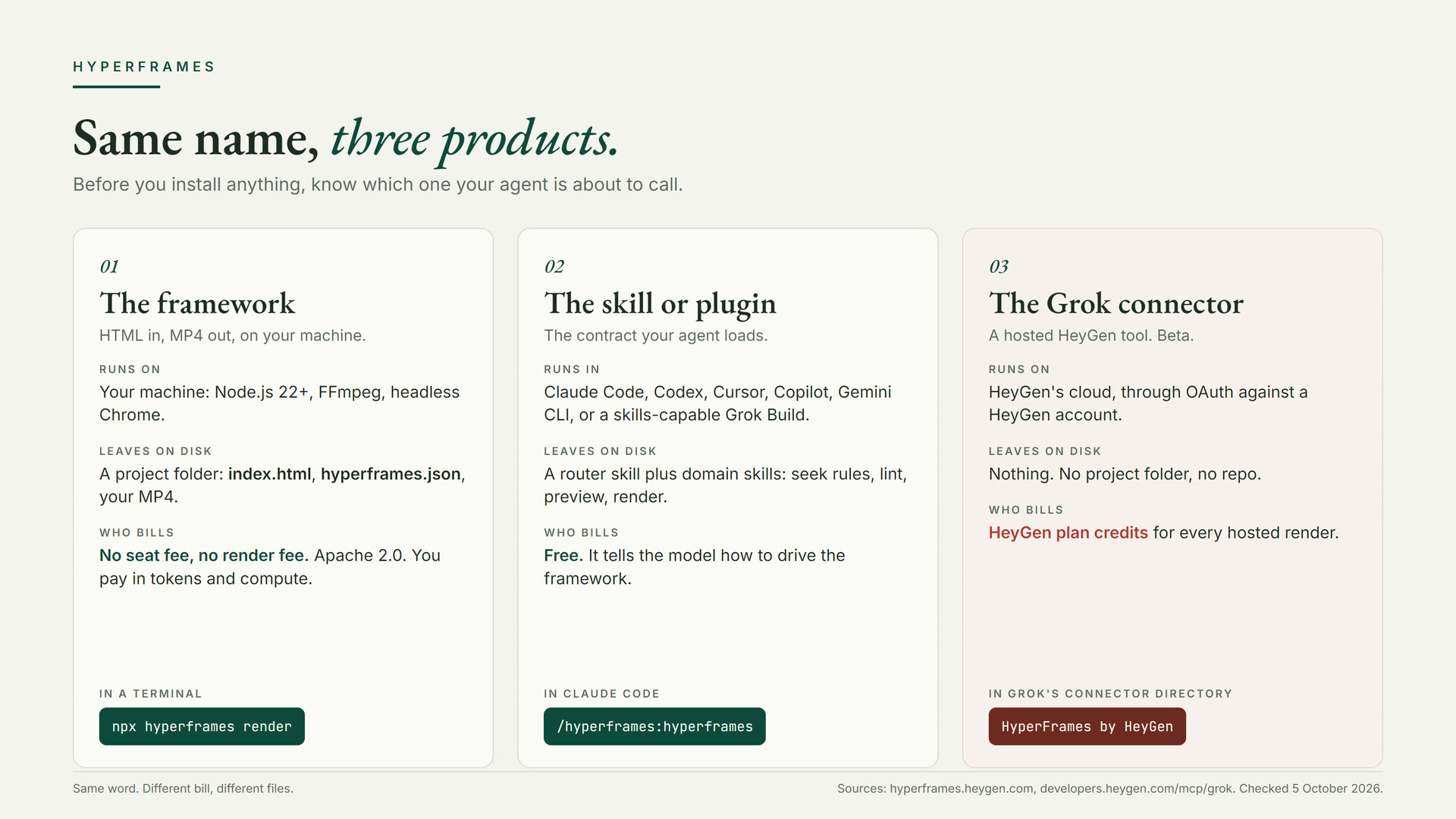
1. Know which HyperFrames your agent is calling
People use the name for three things. The framework renders on your machine. The skill or plugin is the contract your agent loads so it writes compositions the renderer can seek. The Grok connector, "HyperFrames by HeyGen" in Grok's connector directory, is a hosted HeyGen tool: it authenticates with OAuth, renders on HeyGen's infrastructure, draws HeyGen plan credits, and HeyGen calls it beta.
For a maintainer, the line is simple. If the output has no source in the repo, it cannot go through review. A connector render may be fine for a one-off, but it is not a pipeline you can gate.
2. Pin the CLI the way you pin everything else
npx hyperframes with no version resolves whatever is newest at run time. That is fine on a laptop and wrong in CI. The scaffolder already knows this: npx hyperframes init title-card --non-interactive wrote a package.json whose scripts call an exact version.
{
  "scripts": {
    "dev": "npx --yes hyperframes@0.8.135 preview",
    "check": "npx --yes hyperframes@0.8.135 check",
    "render": "npx --yes hyperframes@0.8.135 render",
    "publish": "npx --yes hyperframes@0.8.135 publish"
  }
}- Keep the pin. Upgrade on purpose, in its own PR, and rerun the gate on every composition in the repo.
- Use
--non-interactivewhenever CI or an agent scaffolds a project. - The CLI help says
initchecks the agent skills against GitHub while the skills.sh registry catches up. SetHYPERFRAMES_SKIP_SKILLS=1to opt out in CI and tests. - Commit
hyperframes.json,meta.json, the composition HTML, local media, and the agent'sBRIEF.md. Do not commit renders unless you mean to.
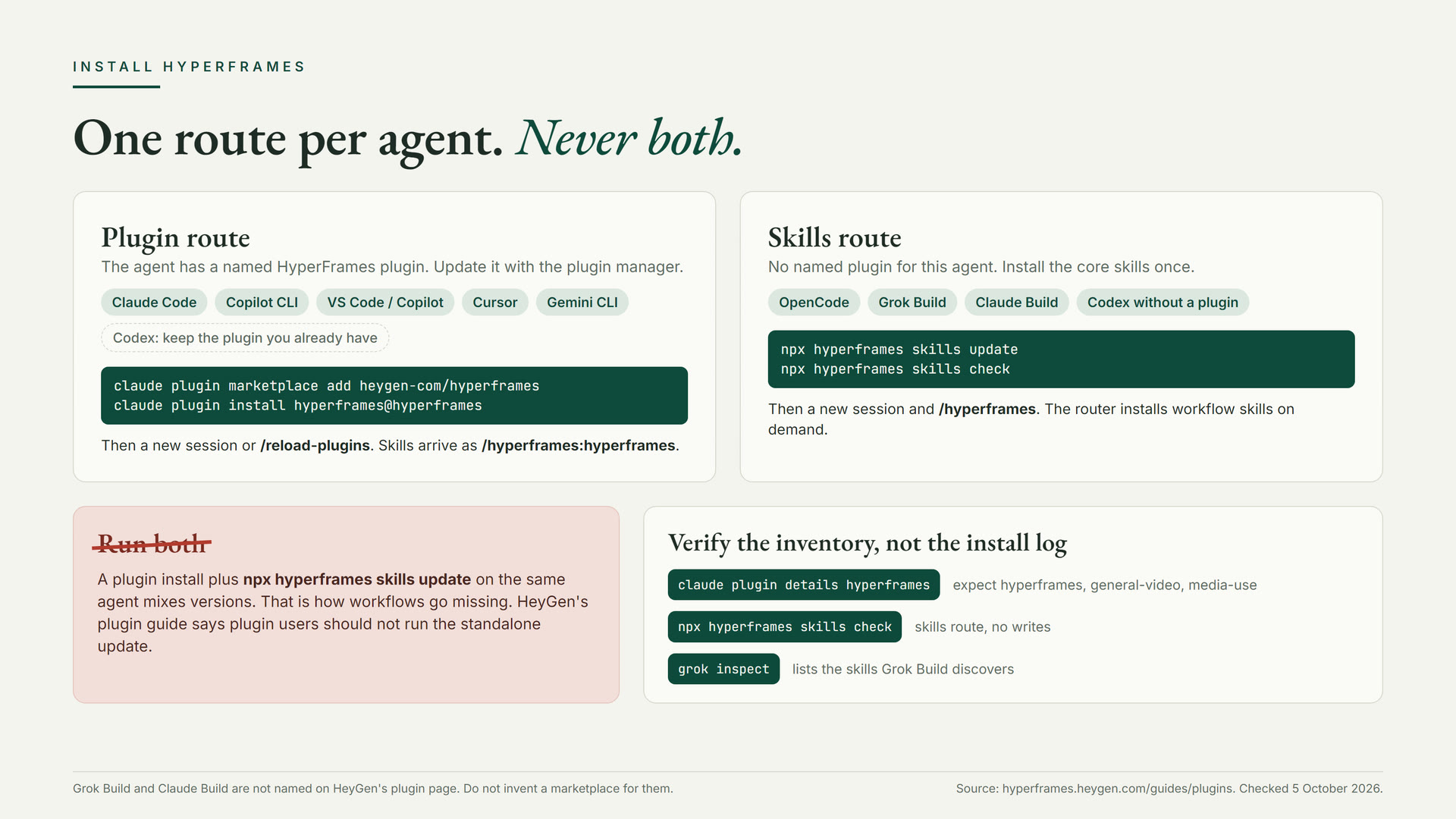
3. One install route per machine, verified
HeyGen documents two routes for the agent side. Agents with a named plugin (Claude Code, Copilot CLI, VS Code with Copilot, Cursor, Gemini CLI) use the plugin route. OpenCode and agents without a plugin use the skills route. HeyGen's plugin guide says plugin users should not run npx hyperframes skills update. Mixing the two on one agent is how workflows go missing.
A plugin does not synchronize machines, so every workstation and every self-hosted runner that hosts an agent needs its own install and its own check. Make the check part of onboarding:
- Codex: if a HyperFrames plugin is already installed, keep it. HeyGen's plugin page says directory updates are published separately. Otherwise use the skills route.
- Grok Build and Claude Build are not named on HeyGen's plugin page. Use the skills route. On Grok Build 1.0.46,
grok inspectprinted a Skills section that included skills from Claude-compatible paths, tagged[claude]. - Do not fill a gap with a fork marketplace. A third-party Codex note pointed people at a personal marketplace repo. That is not the HeyGen release. Treat unofficial installers as unverified.
- The README notes that
npx skills add heygen-com/hyperframesresolves the skills.sh registry copy, which can lagmainby hours, whilenpx hyperframes skills updateinstalls from currentmain. A non-interactiveskills addwithout--skillinstalls all 21 published skills.
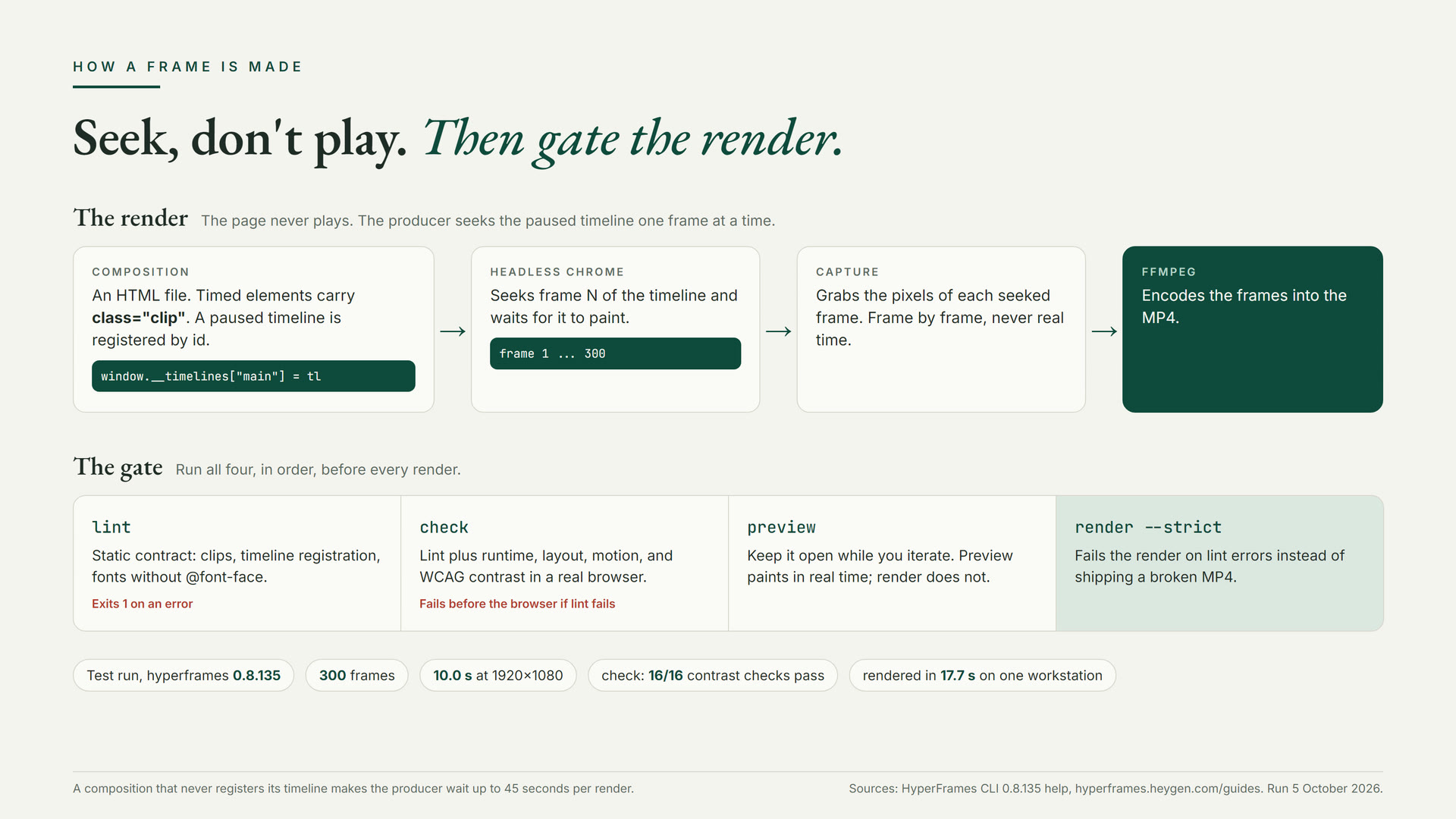
4. The gate: lint, check, then render --strict
HeyGen's prompting guide calls npx hyperframes lint && npx hyperframes check the gate and says both must pass before you render. In CI, add two render flags so a broken composition fails the job instead of uploading a broken MP4.
Here is what each step did on our test project. The first lint caught a monospace font with no @font-face rule (font_family_without_font_face) and exited 1. check exited 1 too, and said its layout, motion, and contrast results were empty placeholders because the browser session never ran. After a font swap, check reported 0 lint, runtime, and motion errors, 0 layout issues across 9 samples, and 16 of 16 text checks passing WCAG AA.
lintreads the composition contract statically: clips, timing attributes, timeline registration, fonts.checkruns the composition in a headless browser: structure, runtime errors, layout collisions, motion, and contrast.check --strictexits non-zero on warnings too.render --strictfails on lint errors;--strict-alladds warnings.--no-best-effortfails on missing or unready media instead of rendering around it.--no-browser-gpuforces software capture (SwiftShader). A hosted runner has no GPU, so test with it locally before you trust CI.
5. A workflow file you can start from
This job gates and renders one composition stored at video/title-card. The actions are pinned to full commit SHAs, resolved from each action's latest release on October 5, 2026. Re-resolve them when you adopt this.
Tested status: every HyperFrames command in this file ran locally, in this order, on October 5, 2026, with software capture: browser ensure, lint, check --no-browser-gpu, then render --strict --no-best-effort --no-browser-gpu. All exited 0, and the render took 21.3 seconds. The YAML itself has not run on a GitHub-hosted runner. Treat it as a starting point, not a certified pipeline.
name: video-gate

on:
  pull_request:
    paths: ['video/**']
  push:
    branches: [main]
    paths: ['video/**']

permissions:
  contents: read

jobs:
  gate-and-render:
    runs-on: ubuntu-24.04
    timeout-minutes: 20
    defaults:
      run:
        working-directory: video/title-card
    steps:
      - uses: actions/checkout@3d3c42e5aac5ba805825da76410c181273ba90b1 # v7.0.1
      - uses: actions/setup-node@820762786026740c76f36085b0efc47a31fe5020 # v7.0.0
        with:
          node-version: 22

      - name: Install FFmpeg
        run: sudo apt-get update && sudo apt-get install -y ffmpeg

      - name: Fetch the capture browser
        run: npx --yes hyperframes@0.8.135 browser ensure

      - name: Lint (static contract)
        run: npx --yes hyperframes@0.8.135 lint

      - name: Check (browser, layout, motion, contrast)
        run: npx --yes hyperframes@0.8.135 check --no-browser-gpu

      - name: Render, failing on lint errors or unready media
        run: >
          npx --yes hyperframes@0.8.135 render
          --strict --no-best-effort --no-browser-gpu
          --output final.mp4

      - uses: actions/upload-artifact@043fb46d1a93c77aae656e7c1c64a875d1fc6a0a # v7.0.1
        with:
          name: title-card-mp4
          path: video/title-card/final.mp4
          retention-days: 14
browser ensuredownloads a pinned chrome-headless-shell into a user cache (on our machine, version 152.0.7977.30 under~/.cache/hyperframes/chrome). Cache that folder if cold starts matter.- Keep
permissions: contents: read. A render job has no reason to write to the repo. - If a composition has no timeline on purpose, mark the root with
data-no-timeline. Otherwise the renderer waits out the player-ready timeout, 45 seconds by default, on every render, and lint flags it asmissing_data_no_timeline.
6. Do not diff MP4 bytes across capture modes
We rendered the same composition twice on the same machine. Hardware GPU capture produced 447.9 KB in 17.7 seconds. Software capture (SwiftShader) produced 467.4 KB in 21.3 seconds. FFmpeg scored the pair at SSIM 0.9986 and about 52 dB PSNR: visually the same video. The SHA-256 hashes did not match.
So a checksum is not a regression test unless the environment is pinned. The CLI's --docker flag is described as a deterministic render, and HeyGen's docs call Docker a pinned rendering environment. Our workstation had no Docker (doctor said so), so our renders were not pinned. If you need byte-stable output, render in Docker on both sides. If you do not, review frames, not hashes: npx hyperframes snapshot --at 0,3,8 captures stills you can attach to a PR.

7. Reviewing an agent-made composition in a PR
Never let the builder grade its own homework. The agent that wrote the composition should not be the only thing that approves it. CI runs the machine gate; the reviewer reads the source and watches the artifact. A checklist that catches what we have seen go wrong:
- Every timed visible element has
class="clip"plusdata-start,data-duration, anddata-track-index. - The paused timeline is registered on
window.__timelinesunder the same id as the root'sdata-composition-id. - No composition script calls
play()orpause()or setscurrentTime. HeyGen's docs are explicit: HyperFrames owns media playback. - No animation of
width,height,top, orlefton a<video>element. HeyGen's symptom is "a video freezes while its box animates." Animate a wrapper instead. - Fonts are named on purpose. On our run, the compiler fetched Google Fonts and injected
@font-facerules for six requested families, and a Georgia stack rendered as EB Garamond. Name the face you want; do not assume a system font exists on the runner. - Media is local. Expiring URLs, permissions, and cross-origin rules break renders that previewed fine. Oversized source images slow preview; resize them.
- The MP4 artifact is attached and someone watched it end to end.
8. Cost, effort, and what not to promise
On the local path, the bill is tokens. A skill author on r/ClaudeCode warned in June 2026 that one HyperFrames launch video does a lot of planning. A title card is cheap; a multi-scene piece with voiceover is not. Watch session cost the way you watch CI minutes.
Treat any one-shot render as a first cut. A first cut still goes through the gate and the review.
Star counts are attention, not correctness. Audit it like any dependency that runs code on your runner.
Cross-network companions
Hands-on install steps, the first prompt, and an interactive session walkthrough for skill authors: Install HyperFrames Without Mixing Routes on Learn Claude Skills.
The three bills, the Opus 5.5 benchmark and its dissent, the Remotion comparison, and a decision record for engineering leaders: HyperFrames Is a Contract, Not a Button on ClaudeSkillsGuide.
Before you install any skill, video or not, read it first: Read Before You Run, the 5-minute skill audit.

